728x90
반응형
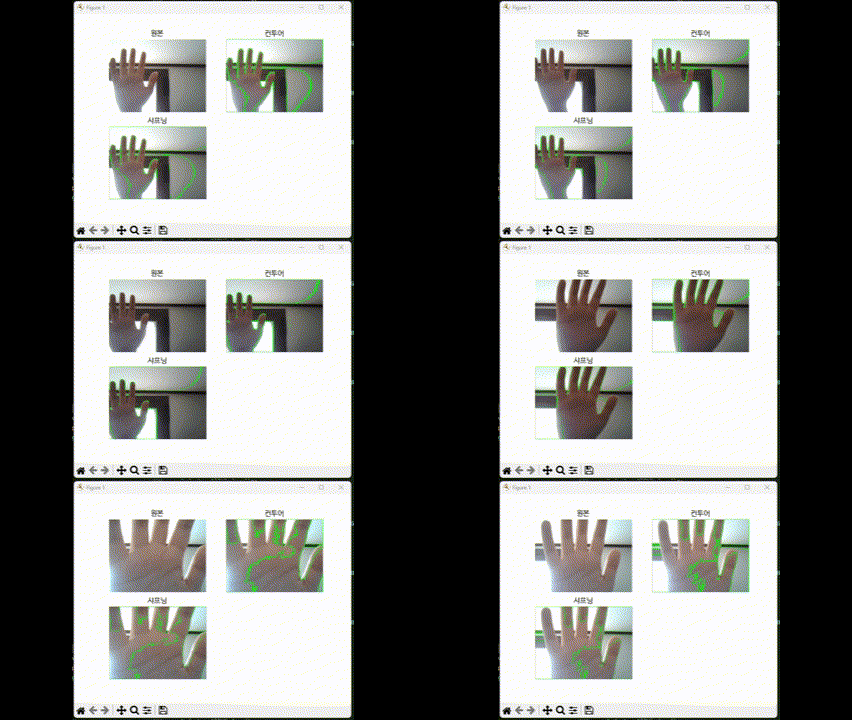
# 실습.손 윤곽선을 감지하고 필터를 추가
# 웹캠 연결
cap = cv2.VideoCapture(0)
plt.ion()
while cap.isOpened():
ret, frame = cap.read()
if not ret: # TRUE FALSE 값 판별
break
# 원본
original = frame.copy()
gray = cv2.cvtColor(frame, cv2.COLOR_BGR2GRAY)
# 이진화 처리
_, binary = cv2.threshold(gray, 127, 255, cv2.THRESH_BINARY)
# 컨투어 처리
contours, _ = cv2.findContours(
binary, cv2.RETR_EXTERNAL, cv2.CHAIN_APPROX_SIMPLE)
# 컨투어 그리기
contour_frame = frame.copy()
cv2.drawContours(contour_frame, contours, -1, (0, 255, 0), 2)
# 샤프닝 필터
kernel = np.array([[0, -1, 0],
[-1, 5, -1],
[0, -1, 0]
])
sharped = cv2.filter2D(contour_frame, -1, kernel)
# 원본
plt.subplot(2, 2, 1)
plt.imshow(cv2.cvtColor(original, cv2.COLOR_BGR2RGB))
plt.title("원본")
plt.axis('off')
# 윤곽선 그리기기
plt.subplot(2, 2, 2)
plt.imshow(cv2.cvtColor(contour_frame, cv2.COLOR_BGR2RGB))
plt.title("컨투어")
plt.axis('off')
# 샤프팅 필터터qqqq
plt.subplot(2, 2, 3)
plt.imshow(cv2.cvtColor(sharped, cv2.COLOR_BGR2RGB))
plt.title("샤프닝")
plt.axis('off')
plt.pause(0.001)
plt.clf()
key = cv2.waitKey(1)
if key == ord('q'):
break
cap.release()
cv2.destroyAllWindows()
plt.ioff()
반응형
'하루코딩 > python 하루코딩' 카테고리의 다른 글
| [Python] 프로그래머스 기출테스트 0LV (0) | 2025.01.16 |
|---|---|
| [Python] 수도권 영역 표시 (0) | 2025.01.10 |
| [Python] 그래프 그리기 (0) | 2024.12.18 |
| [Python] 막대그래프와 도넛 그래프 (0) | 2024.12.17 |
| [Python & 데이터] 공공데이터 활용 (0) | 2024.12.15 |


